OpenAI Studio Review 2026: Can One AI Dashboard Really Replace 10+ Expensive AI Tools?
Thinking about buying OpenAI Studio? Before you spend your money, read this in-depth review to understand what it offers, who it’s designed for, and whether the one-time payment provides real value
AI tools are becoming more powerful every month, but managing several subscriptions can quickly become expensive. Many users pay separately for AI writing, image generation, voiceovers, coding assistants, video creation, transcription, and other specialized tools. Besides the monthly costs, switching between different dashboards also slows down everyday work.
This OpenAI Studio Review looks at a platform that aims to simplify that experience by bringing multiple AI capabilities into a single dashboard. According to the launch information, OpenAI Studio combines more than 13 specialized AI agents, including tools for video creation, image generation, copywriting, coding, voiceovers, transcription, proofreading, data analysis, and web chat. The product also emphasizes one-time pricing instead of ongoing subscriptions.
For this review, I examined the available launch documentation, feature descriptions, pricing information, and workflow explanations. Rather than repeating sales claims, the goal is to explain what buyers actually receive, who is likely to benefit most, and where expectations should remain realistic. One aspect that immediately stood out is the platform’s focus on organizing different AI tasks through dedicated agents instead of presenting a single general-purpose chatbot.
Table of Contents
What Is OpenAI Studio?
OpenAI Studio is a web-based AI platform designed to bring multiple OpenAI-powered capabilities together under one interface. Instead of requiring users to manage separate tools for video generation, image creation, coding, copywriting, voice synthesis, transcription, and analytics, it groups these functions into dedicated AI agents that are accessible from a single dashboard. The launch materials describe this approach as an “OpenAI Operating System” focused on reducing the need for multiple subscriptions and simplifying everyday AI workflows.
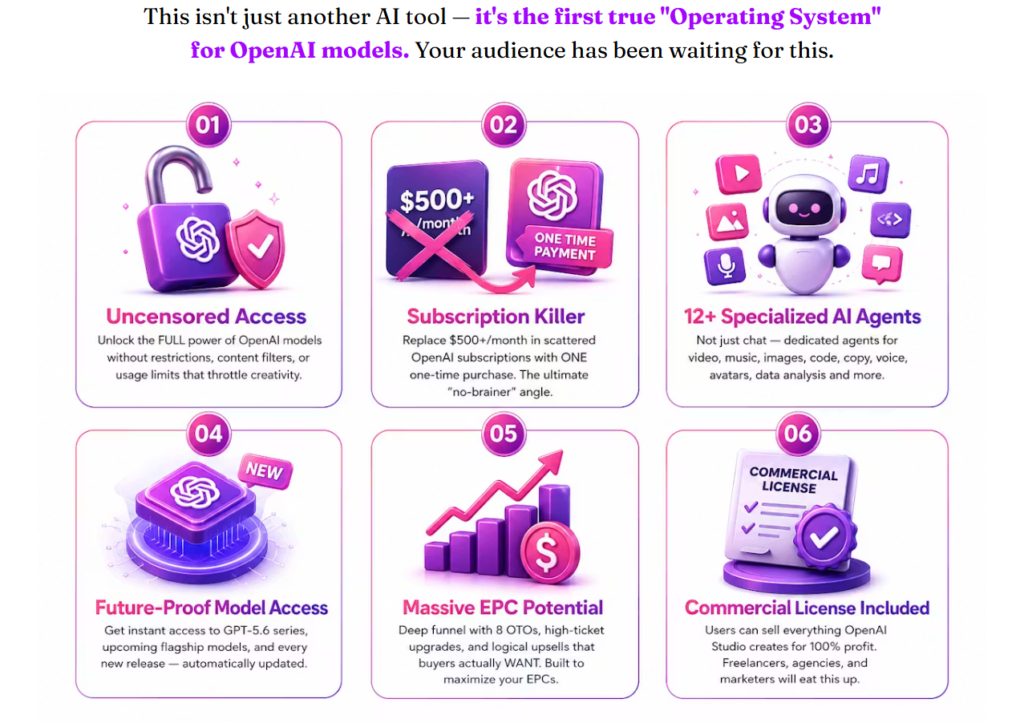
The platform includes more than 13 specialized agents, such as Cinematic Videos, Music, HD Images, Voiceovers, Social Media Posts, Code, Proofreading, Data Insights, Deep Vision, and Web Chat. Each agent is intended to handle a specific type of task while keeping the overall experience within one workspace.
From the available information, OpenAI Studio appears best suited for freelancers, marketers, agencies, business owners, developers, and content creators who regularly produce different kinds of digital assets.
Quick Answer
Price: Starts at $16.95
Best For: Content creators, affiliate marketers, freelancers and agencies
Main Limitation: Long-term real-world user feedback is not yet available because this is a pre-launch review.
Verdict: A promising all-in-one AI workspace if its workflow matches your daily content needs.
About the Creator

OpenAI Studio is being launched by Seyi Adeleke, a well-known digital product vendor in the affiliate marketing community. According to the launch documentation, the product will be released through the LaunchPad platform with a structured sales funnel and affiliate program. The launch materials also emphasize ongoing affiliate support and promotional resources for partners.
While the marketing claims are ambitious, buyers should evaluate the software based on the available features, pricing, and how well those features fit their own workflow rather than on promotional language alone
How Does OpenAI Studio Work?
OpenAI Studio follows a simple three-step workflow designed to reduce the complexity of using multiple AI tools. Instead of selecting different websites for different tasks, users begin by choosing the AI agent that best matches their goal.
Step 1: Choose an AI Agent
Select the tool that matches your project, such as Video, Image, Music, Voiceover, Code, Social Media, or Copywriting.
Step 2: Describe Your Task
Enter your request in natural language. The platform routes the task to the most appropriate AI capability and begins generating the requested content.
Step 3: Download and Use
Once the content is generated, you can review it, make changes if needed, and download it for business or personal use.
Quick Answer
Learning Curve: Beginner Friendly
Time to Create Content: Usually a few minutes, depending on the task.
Technical Skills Required: Minimal
Why OpenAI Studio Will Dominate Your Leaderboard
How to Use OpenAI Studio
If you’ve never used OpenAI Studio before, this section will help you understand the basic workflow.
Step 1: Create Your Account
Purchase the front-end offer and log in using the credentials provided after checkout. Once inside, you’ll see the main dashboard displaying all available AI agents.
Expected Result: Access to your workspace and available tools.
Step 2: Select the Right AI Agent
Choose the AI agent based on what you need to create.
For example:
- Video Agent
- Image Generator
- Music Creator
- Voiceover Generator
- Coding Assistant
- Copywriting Agent
- Data Analysis Agent
Each tool is dedicated to a specific task rather than trying to do everything from one general interface.
Step 3: Enter Your Prompt
Describe your project in plain English (or another supported language). For example:
“Create a Facebook ad promoting my fitness coaching business.”
or
“Write a professional sales email for my software launch.”
The platform then processes your request through the selected AI agent.
Step 4: Review the Output
Read through the generated content carefully. While AI can save time, it’s still a good idea to check accuracy, branding, and tone before publishing.
Step 5: Export Your Project
After making any edits, download the final result. Depending on the selected agent, this could be an image, document, script, voice file, video asset, or other supported output.
Most beginners should be able to understand the basic workflow within a short time because the process is centered around choosing an agent, entering a prompt, and reviewing the result.
What Stood Out During My Evaluation of OpenAI Studio
For this review, I examined the vendor’s documentation, feature descriptions, workflow explanations, pricing, and launch materials. I compared the listed capabilities with the platform’s stated goals to evaluate whether the product addresses common productivity challenges for marketers, freelancers, and agencies.
The biggest strength is the platform’s organization. Instead of presenting a single AI chat interface, OpenAI Studio separates different tasks into dedicated agents. This structure may appeal to users who frequently switch between writing, image generation, coding, video creation, transcription, and marketing tasks.
Another positive point is the inclusion of a commercial license, which means users can create work for clients or business purposes without needing separate licensing for standard outputs.
One limitation worth mentioning is that, at the time of writing, this is still a pre-launch evaluation. Independent long-term user reviews and public performance data are not yet available. As with any newly launched software, buyers should wait for ongoing updates and community feedback before making assumptions about long-term reliability.
Another consideration is that AI-generated content still benefits from human review. Whether you’re creating articles, marketing copy, or videos, checking the output for accuracy and consistency remains important.
Quick Answer
Best Feature: 13 specialized AI agents in one dashboard.
Biggest Advantage: One-time payment instead of managing multiple subscriptions.
Main Limitation: No independent long-term user data yet.
OpenAI Studio Key Features
1. Cinematic Video Agent
Generate marketing videos, product commercials, YouTube content, TikTok clips, and promotional videos without relying on traditional editing software. This feature is especially useful for content creators and digital marketers.
2. Music Generation
Create original background music, jingles, podcast intros, and soundtracks in different styles. This can help creators avoid searching for royalty-free music libraries.
3. HD Image & Graphics Generator
Design logos, banners, thumbnails, product mockups, and marketing graphics from text prompts. Freelancers and agencies may find this particularly useful for client work.
4. Photorealistic Avatar Generator
Create AI-generated digital characters and avatars suitable for presentations, branding, and promotional materials.
5. AI Voiceovers
Generate human-like voice narration in multiple languages with natural pronunciation, making it useful for videos, presentations, and e-learning content.
6. Social Media Content Generator
Produce captions, tweets, Facebook posts, threads, and other social content optimized for engagement across multiple platforms.
7. Copywriting Assistant
Generate sales pages, advertisements, product descriptions, and email campaigns. This feature targets affiliate marketers, business owners, and agencies creating promotional content.
8. AI Coding Assistant
Write, explain, and debug code across multiple programming languages, making it useful for developers and technical users.
9. Proofreading Tool
Review documents, emails, and articles to improve grammar, spelling, and writing style before publishing.
10. Transcription Tool
Convert audio or video into text with timestamps and speaker identification, supporting podcasts, interviews, and meetings.
11. Deep Vision
Upload an image and receive AI-generated descriptions or analysis, which can help interpret visual information.
12. Data Insights & Math
Analyze spreadsheets, solve calculations, and generate business insights from uploaded data.
13. Web Chat Agent
Interact with webpages by summarizing content, extracting key information, or asking follow-up questions about the page
OpenAI Studio vs ChatGPT + Alternatives
One of the biggest questions buyers ask is whether OpenAI Studio offers enough value compared to subscribing directly to ChatGPT or using separate AI applications.
The answer depends on how you work.
If you mainly use AI for writing, a dedicated chatbot may be sufficient. However, if your daily workflow includes videos, graphics, voiceovers, coding, transcription, social media content, and business assets, OpenAI Studio aims to bring those tasks together in one dashboard instead of requiring multiple websites.
Comparison Table:
| Feature | OpenAI Studio | ChatGPT | Canva AI | Jasper AI |
|---|---|---|---|---|
| One Dashboard | ✅ | ❌ | ❌ | ❌ |
| AI Writing | ✅ | ✅ | Limited | ✅ |
| AI Images | ✅ | ✅ | ✅ | ❌ |
| AI Videos | ✅ | Limited | Limited | ❌ |
| Voice Generator | ✅ | Limited | ❌ | ❌ |
| Music Generator | ✅ | ❌ | ❌ | ❌ |
| Coding Assistant | ✅ | ✅ | ❌ | ❌ |
| Proofreading | ✅ | ✅ | ❌ | Limited |
| Commercial License | ✅ | Depends | Depends | Depends |
| Best For | All-in-One Workflow | General AI Chat | Design | Marketing Copy |
OTO Breakdown: Are The Upsells Worth It?
OTO 1 – Unlimited ($67)
What it does
Removes front-end limitations and increases usage capacity.
Who should buy it
Freelancers, agencies, and heavy users who expect to generate content daily.
Worth it?
YES, if you plan to use OpenAI Studio as part of your business.
OTO 2 – Done For You ($297)
What it does
Provides ready-made assets and business resources.
Who should buy it
Beginners wanting a faster start.
Worth it?
Only if you prefer pre-built materials instead of creating everything yourself.
OTO 3 – Automation ($47)
What it does
Adds automation features to reduce repetitive work.
Who should buy it
Businesses creating large amounts of content.
Worth it?
Yes, for regular users.
OTO 4 – Swift Profits ($47)
What it does
Adds business-focused income resources.
Who should buy it
Affiliate marketers and freelancers.
Worth it?
Maybe.
It depends on whether you’ll actually use the included strategies.
OTO 5 – Limitless Traffic ($97)
What it does
Traffic-related training and tools.
Who should buy it
Website owners and marketers.
Worth it?
Only if traffic generation is currently your biggest challenge.
OTO 6 – Agency ($167)
What it does
Agency rights and client management features.
Who should buy it
Freelancers and agencies serving clients.
Worth it?
Definitely, if you’re planning to sell AI services.
OTO 7 – Franchise Edition ($97)
Adds expanded business rights.
Worth considering for experienced marketers.
OTO 8 – Multiple Income ($47)
Additional monetization resources.
Suitable for users building several online income streams.
OpenAI Studio Pros and Cons
Every software product has strengths and limitations. Based on the available documentation, these are the most notable points.
Pros
- One dashboard for multiple AI tasks, reducing the need to switch between different platforms.
- 13+ specialized AI agents covering video, images, music, voice, copywriting, coding, transcription, and more.
- Commercial license included, allowing users to create content for client projects.
- Beginner-friendly workflow with a simple three-step process.
- Suitable for freelancers, agencies, marketers, developers, and business owners.
- One-time front-end pricing instead of another recurring monthly subscription.
Cons
- Important Limitation: Independent long-term customer reviews are not yet available because this is a new launch.
- Important Limitation: Output quality may vary depending on the prompts and the specific AI task.
- Some advanced features may require optional upgrades.
- Users should always review AI-generated content before publishing it.
OpenAI Studio Pricing: Is It Worth It?
The front-end offer launches at $16.95 during the Early Bird period before increasing gradually during the launch.
Considering the number of AI agents included, the entry price is relatively low compared to paying for several separate AI subscriptions. However, the real value depends on how often you use the available tools. Someone who only needs AI writing may not benefit as much as a freelancer or agency producing different types of content every week.
If you expect to use video creation, graphics, voiceovers, coding, and copywriting regularly, the pricing appears competitive for an all-in-one platform.
Bonuses
At the time of writing, the vendor provides promotional bonus materials for affiliates, but there is no confirmed public buyer bonus package listed in the launch documentation. Buyers should check the official sales page or their affiliate’s bonus page before purchasing to see whether any additional bonuses are available.
If you purchase through my link, any exclusive bonuses I offer will be listed clearly on this page before checkout.
Real World Use Cases
One of the biggest strengths of OpenAI Studio is that it isn’t limited to a single type of content. Instead, it combines multiple AI agents that can support different professional workflows. Based on the documented feature set, here are several practical ways users could apply the platform.
1. Affiliate Marketers
Affiliate marketers can use the Copy & Email Agent to draft review articles, promotional emails, ad copy, and landing page content. They can also create product banners, thumbnails, and promotional videos using the Image and Video Agents.
2. YouTube Content Creators
Creators can generate scripts, produce voiceovers, create thumbnails, design channel graphics, and even develop background music without relying on multiple external tools.
3. Freelancers
Freelancers working on Fiverr or Upwork can deliver AI-assisted services such as logo design, blog writing, coding assistance, transcription, proofreading, and social media content.
4. Small Business Owners
Business owners can prepare marketing materials, product descriptions, promotional graphics, and customer emails while reducing the need to subscribe to multiple software services.
5. Agencies
Marketing agencies managing several clients may benefit from having video, copywriting, voiceover, and design capabilities available from a single dashboard.
Who Is This For?
OpenAI Studio appears best suited for users who create digital content on a regular basis.
It may be a good fit for:
- Affiliate marketers creating promotional campaigns.
- Freelancers delivering AI-powered services to clients.
- Agencies managing multiple content projects.
- Bloggers and website owners.
- YouTubers and video creators.
- Developers needing occasional coding assistance.
- Small business owners producing marketing content.
Who Should Skip This?
While OpenAI Studio covers many use cases, it may not be the right choice for everyone.
You may want to skip it if:
- You only need a simple AI chatbot for occasional questions.
- You already subscribe to several specialized AI platforms and are satisfied with your current workflow.
- You expect AI-generated content to require no editing before publication.
Services You Can Sell Using OpenAI Studio
At the time of writing, the launch materials shared do not specify a refund period or money-back guarantee. If a guarantee is later published on the official sales page, buyers should review those terms carefully before purchasing. Since the source material does not provide a duration, it would not be accurate to assume one.
Money-Back Guarantee
At the time of writing, the launch materials shared do not specify a refund period or money-back guarantee. If a guarantee is later published on the official sales page, buyers should review those terms carefully before purchasing. Since the source material does not provide a duration, it would not be accurate to assume one.
OpenAI Studio FAQ
Is OpenAI Studio worth buying?
It may be worthwhile for users who regularly create different types of digital content and prefer an all-in-one workflow rather than managing several separate AI tools.
Can beginners use OpenAI Studio?
Yes. The platform is presented with a simple three-step workflow, making it approachable for beginners.
Is it a one-time payment?
The launch materials promote a one-time front-end purchase, with optional OTO upgrades available separately.
Are the OTOs required?
No. The front-end product works independently. Upsells provide additional capabilities for users who need them.
Does it include commercial rights?
Yes. The launch documentation states that commercial rights are included.
Can I create client work?
Yes. The commercial license allows users to create work for clients, subject to the product’s license terms.
Does it create videos?
Yes. The Cinematic Video Agent is one of the core features described in the launch materials.
Can it generate images?
Yes. The HD Images & Graphics Agent supports creating logos, thumbnails, banners, mockups, and marketing graphics.
Is coding supported?
Yes. The Code Agent can write, explain, and debug code across different programming languages.
Can it transcribe audio?
Yes. The Word Transcription Agent converts audio and video into text with timestamps and speaker identification.
Final Verdict: Open AI studio Review 2026
OpenAI Studio brings together a broad collection of AI capabilities under one dashboard, including video generation, image creation, voiceovers, copywriting, coding, transcription, proofreading, data analysis, and web chat. For users who frequently switch between different AI applications, that unified approach may simplify daily work.
Based on the available launch documentation, the platform presents an attractive feature set at an accessible entry price. However, because this review is based on pre-launch materials, prospective buyers should also consider future user feedback, updates, and support quality as the product matures.
If your workflow involves creating varied digital content and you value having multiple AI tools in one place, OpenAI Studio is worth considering.
Instead of paying for multiple AI subscriptions, consider whether one dashboard with dedicated AI agents better matches the way you work.
Affiliate Disclaimer:
This website contains affiliate links. If you choose to purchase products through these links, I may earn a small commission at no additional cost to you. Please note that I only recommend products that I have thoroughly researched or tested and believe will provide genuine value. My goal is to help you make informed decisions. Thank you for supporting this site!
Sasi Digital
Privacy Policy | Terms & Condition | Earning Disclaimer
© 2026 Sasii Digital. All rights reserved
💬 Leave a Comment
Click to rate